

Understanding Dual-Band Wi-Fi Equipment
2.4 GHz & 5 GHz frequencies
The latest WI-FI equipment is faster and more versatile than ever, offering many powerful new features. One important feature makes it possible for the equipment to send data over two different radio frequencies or “bands”; the 2.4 GHz band and the 5 GHz band. Equipment that uses both bands is called “dual-band” equipment. To get the most out of your dual-band equipment, it helps to understand the differences between these two frequencies and how the equipment uses them both to give you the best possible home WI-FI experience.
About the 2.4 GHz frequency
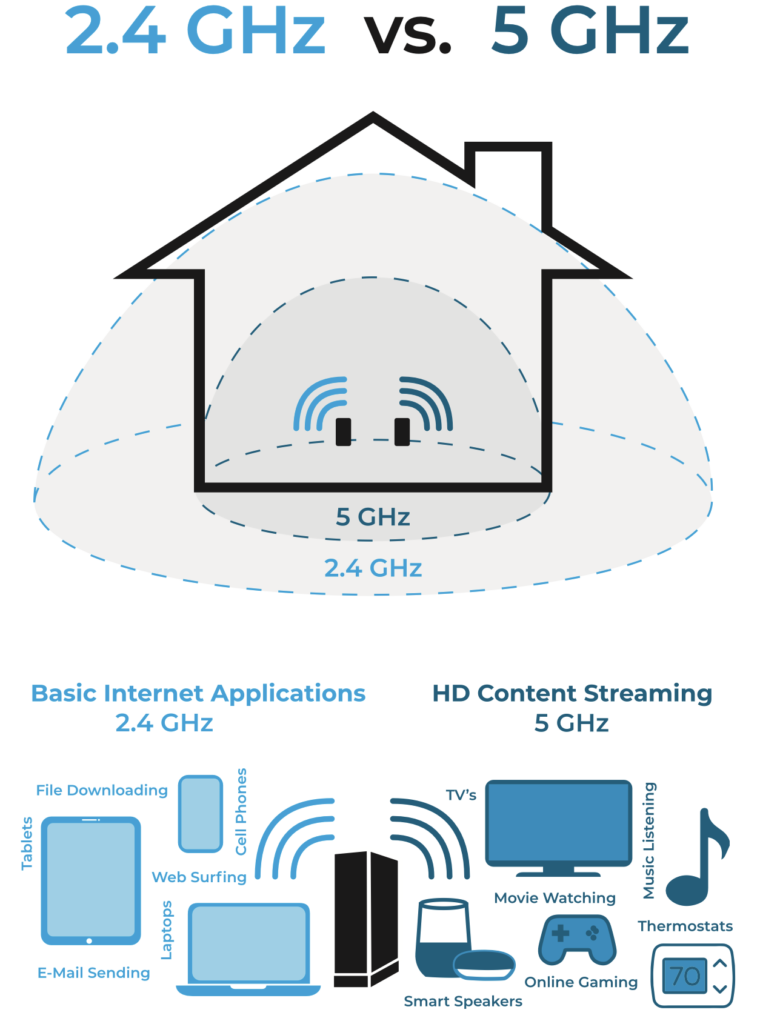
Let’s start with the 2.4 GHz frequency. When the first WI-FI equipment was released, this was the only frequency they used to send and receive data. One of the advantages of the 2.4 GHz frequency is that it can transmit a strong signal over a fairly large area in your home. It is also good at penetrating solid objects in our home, like walls and floors. Overall, this allows you to maintain a strong WI-FI connection as you move further away from your WI-FI equipment.
One downside of the 2.4 GHz frequency is that it has become more and more crowded. This is partly because it provides fewer channels than the 5 GHz band. As a result, in addition to interference from other WI-FI equipment located nearby, your 2.4 GHz WI-FI network can experience interference from many common household devices. These include microwave ovens, cordless phones, wireless speakers, Bluetooth devices and baby monitors. When your network is experiencing interference from these nearby devices, your speed and overall performance suffer.
Another downside it that the maximum speeds offered by 2.4 GHz networks are typically less than 100 Mbps in practice. If there are multiple users trying to perform certain high-bandwidth activities at the same time – streaming HD video for example – then the 2.4 GHz band will likely not be fast enough.
About the 5 GHz frequency
To provide faster speeds, and limit the impact of interference from other devices, manufacturers added support for the 5 GHz frequency in the latest generation of WI-FI equipment. With two frequencies (bands) available, dual-band equipment can handle much more traffic. What’s more, the 5 GHz band supports speeds that are four times faster than the 2.4 GHz frequency, so devices and applications that use the most bandwidth generally perform better on the 5 GHz frequency. The 5 GHz band also has many more channels than the 2.4 GHz band which reduces interference from other devices.
Like the 2.4 GHz frequency, the 5 GHz frequency has some drawbacks. In general, it can’t broadcast its WI-FI signal as far as the 2.4 GHZ frequency and it is not as good at penetrating the walls and floors within your home.
How does dual-band equipment work?
Dual-band equipment supports both the 2.4 GHz and the 5 GHz frequencies. In most cases, the device you are using to connect to WI-FI, such as your laptop or smart phone, chooses the band. For example, your brand-new phone might stay on the 2.4 GHz band as long as it can connect to it, even though there may be less congestion and more bandwidth available on the 5 GHz band. It will switch to the 5 GHz band if it can no longer connect to the 2.4 GHz band.